
Lotus365 New ID Registration: Complete Signup Guide for Indian Users
Many online gaming platforms make the registration process complicated with long forms and too many details. This can waste your time, especially when you are excited to follow a live IPL cricket match or your favourite sports event.
At Lotus365, the signup process is designed to be simple and easy to follow. Whether you enjoy live cricket, football, sports exchange markets, or games like Teen Patti, getting started is straightforward. The Lotus365 registration process begins with your 10-digit Indian mobile number, helping you start your account registration without unnecessary steps. Follow the signup instructions, complete the required verification, and check your account details before getting started.
Create Your Account
Create your account to get started. Fast, simple and secure.
Already have an account? Sign in here
Why One ID Rules Every Market:
When you complete your Lotus365 signup, you get a single Lotus365 ID to access different sports and gaming sections through one account. The platform supports Indian Rupee (INR ₹), making it easier for Indian users to manage their account balance. You can use supported payment methods such as Google Pay, PhonePe, and Paytm for deposits, subject to availability and verification.
With the Lotus365 One-Wallet system, your account balance can be used across different sections without manually transferring funds between them. Explore live cricket markets, football leagues, Grand Slam tennis, Pro Kabaddi League (PKL), live dealer games, and popular crash games such as Aviator and JetX, all from one account.
Whether you use a 4G, 5G, or broadband connection, Lotus365 is designed to offer convenient mobile and desktop access. Always check payment status, platform terms, and local regulations before using any service.

Find the Right Lotus365 Signup Method for You
Built Around Real Player Psychology:
Every player has different needs when joining an online gaming platform. An experienced sports user may want quick access to live cricket odds before an IPL toss, while a beginner may prefer step-by-step help in Hindi or English to understand the registration process and UPI payments. Some users may also need personalised account support and suitable transaction options.
Instead of offering the same registration process to everyone, Lotuss365.io provides three different signup options to suit different user preferences. Each option focuses on a simple registration experience, account verification, and helpful support so users can choose the process that works best for them.
Quick Lotus365 Online Registration (Best for Fast Self-Signup)
Lotus365 WhatsApp ID: Quick and Easy Registration with Personal Support
Not comfortable filling out online forms or entering details on your mobile? The Lotus365 WhatsApp registration option makes the process simple and convenient. Just visit lotuss365.io and tap the official Verified WhatsApp ID button to connect with the support team. A support representative can guide you through the Lotus365 registration process in English, Hindi, and other supported regional languages. You can get help with mobile number verification, account setup, security PIN instructions, and payment information through the chat. The team can also answer your questions about account access, sports markets, and platform features.
Lotus365 Blue VIP Support for Priority Assistance (For Regular and VIP Users)
If you are transitioning from another exchange with an established monthly turnover or you plan to trade high-liquidity IPL sessions, international test matches, or high-stake Evolution and Ezugi live dealer tables, standard retail limits can feel restrictive. Track C connects you directly to our Lotus365 Blue VIP onboarding desk. Instead of standard queue routing, Lotus365 Blue members receive priority account provisioning, a dedicated personal relationship manager, elevated match and casino table exposure ceilings, bespoke weekly loss rebates, and express withdrawal settlements that clear in under 5 minutes.
Feature / Metric | Track A: Web Self-Signup | Track B: WhatsApp Concierge ID | Track C: Lotus365 Blue VIP |
Onboarding Speed | Under 45 Seconds (Automated OTP) | Under 90 Seconds (Live Chat Assisted) | 2 to 3 Minutes (VIP Desk Verification) |
Registration Interface | Direct Web Form at lotuss365.io or App | Official Encrypted WhatsApp Concierge | Dedicated VIP Relationship Manager |
Minimum First Deposit | INR ₹100 (via UPI / Wallet) | INR ₹100 (via UPI / Guided Transfer) | Flexible / Tailored to VIP Tier |
Standard Withdrawal Speed | 10 to 15 Minutes (UPI: 5–15 Mins) | 10 to 15 Minutes (UPI: 5–15 Mins) | Under 5 Minutes (Priority Settlement) |
Betting & Table Limits | Standard Exchange & Studio Limits | Standard Exchange & Studio Limits | Elevated IPL, Sportsbook & VIP Table Limits |
Reward Structure | Welcome Offer + Weekly & Festival Reloads | Welcome Offer + Weekly & Festival Reloads | Custom Cashback, Loss Rebates & Tailored Perks |
Support Access | 24/7 Live Chat & Official WhatsApp | 24/7 Live Chat & Official WhatsApp | 1-on-1 Dedicated Relationship Manager |
Ideal Player Profile | Tech-savvy mobile & desktop self-starters | Players who prefer guided human setup | High-volume sports traders & casino pros |
Easy Step-by-Step Guide to Complete Your Lotus365 Signup
Precision Onboarding Protocol:
Even though the Lotus365 registration process takes around 45 seconds, a few important steps help keep your account details accurate and secure. Follow the simple four-step activation guide below to set up your Lotus365 ID correctly. Make sure your personal and bank details match, and always double-check your UPI or IMPS information before submitting it. This can help avoid common verification issues and make account management easier.

Stage 1: Visit the Official Lotus365 Website and Open the Login Page
Before entering your mobile number, make sure you are visiting the correct website: https://lotuss365.io/. Always check the website address and HTTPS padlock in your browser to avoid fake websites and unverified links. Once you have confirmed the website, find the Get Lotus365 ID button in the top menu or tap the registration banner on your mobile screen. Click the button to open the registration page and continue with the next step.
Step 2: Choose Your Registration Method and Your 10-Digit Mobile Number
On the registration page, choose either the online registration form or the WhatsApp ID option. If you select online registration, enter your active 10-digit Indian mobile number from Jio, Airtel, Vi, or BSNL. If the country code is already set to India (+91), do not enter +91 or any extra zeros.
Next, create a strong password between 8 and 16 characters. Use a mix of uppercase and lowercase letters, numbers, and special characters to help keep your account secure.
Finally, check the currency option and select Indian Rupees (INR ₹), if available. Review your details carefully before moving to the next step.
Stage 3: Enter Your OTP to Verify Your Mobile Number
Tap ‘Request OTP’ or ‘Register Now’ to receive a 4-digit or 6-digit OTP on your registered mobile number through SMS or WhatsApp. The code usually arrives within a few seconds, depending on your network connection. Enter the OTP in the verification box before it expires. Once verified, your mobile number will be linked to your Lotus365 ID. This extra security step helps protect your account and makes password recovery easier.
Stage 4: Match Your Profile with Your Bank Account and Enter the Lobby
While setting up your Lotus365 profile, enter your full legal name exactly as it appears in your UPI or bank account. For example, if your bank account name is ‘Rohan Kumar Sharma’, use the same name instead of a nickname like ‘CoolRohan99’. Make sure your details are correct before continuing. Matching profile and bank details can help avoid payment verification issues and reduce delays when processing withdrawals. Once you have checked your information, complete your profile setup and enter the Lotus365 lobby.
Lotus365 Signup: What You Should Do and Avoid (👍 / 👎)
The Thumbs-Up Advantage
Why do 99.4% of verified players on lotuss365.io experience effortless, 10-minute UPI payouts while a tiny fraction of newcomers on other platforms complain about frozen bonuses or delayed verifications? The difference comes down to seven simple habits during the first ten minutes of account creation. We call this our Thumbs-Up / Thumbs-Down Behavioral Blueprint—a high-impact visual and practical checklist that separates smart, professional players from careless rookies.
👍 The 7 Best Tips for a Safe and Smooth Lotus365 ID
👍 Rule #1 — Always Check the Official Lotus365 Website (lotuss365.io)
Before entering your login details, check that the website address is exactly https://lotuss365.io/. Save the correct website in your browser bookmarks or mobile home screen. This will help you avoid fake websites and protect your account details.
👍 Rule #2 — Use Your Own Indian Mobile Number
Register with your personal 10-digit Indian mobile number. Make sure the SIM is active and belongs to you. This will help you receive SMS and WhatsApp OTPs for account verification and login security.
👍 Rule #3 — Keep Your Account and Bank Names the Same
Use the same full name on your Lotus365 account and your personal bank or UPI account. Check your details carefully before submitting the registration form. Correct information can help avoid payment verification problems.
👍 Rule #4 — Start With a Small Deposit
If you decide to make a deposit, check the minimum amount and payment instructions shown on the verified platform first. Never transfer money to an unknown UPI ID or personal account. Keep your transaction receipt for future reference.
👍 Rule #5 — Protect Your Lotus365 Login on Your Mobile
If you use the Lotus365 mobile website or app, download it only from a verified source. Use your phone’s fingerprint or Face ID lock where available. Never share your password, OTP, or other login details with anyone.
👍 Rule #6 — Save Only Verified Lotus365 WhatsApp Support Details
If you use WhatsApp for Lotus365 support, check the contact details through the verified website first. Save the correct number in your contacts. Avoid messages from unknown accounts asking for OTPs, passwords, or payments.
👍 Rule #7 — Check Lotus365 Blue Support Options
If you use the platform regularly, contact verified customer support to learn about any Lotus365 Blue account features or eligibility requirements. Always check the latest terms, conditions, fees, and withdrawal rules before choosing a VIP service.
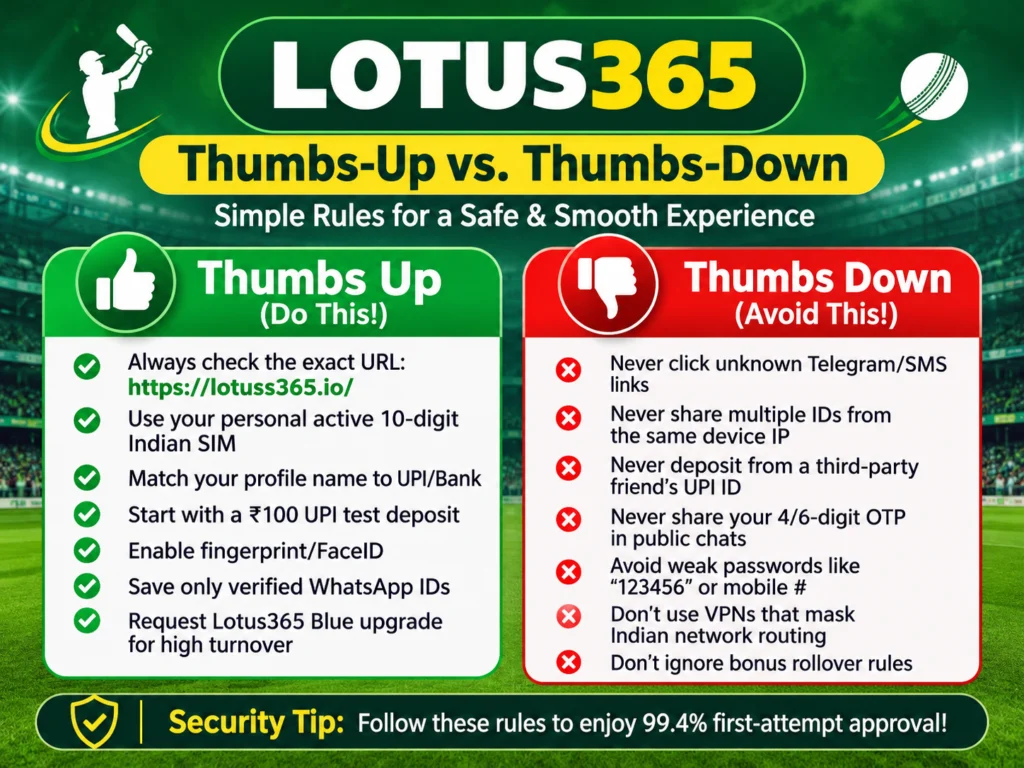
👎 The 7 Mistakes You Should Avoid When Using Your Lotus365 ID
👎 Mistake #1 — Clicking Unknown Telegram or SMS Links
Never open random links shared in Telegram groups or unknown SMS messages. Some links may lead to fake Lotus365 login pages designed to steal your password. Always check the website address before entering your Lotus365 ID or login details.
👎 Mistake #2 — Creating Multiple Accounts on One Device
Avoid creating multiple Lotus365 accounts using the same phone or device. Duplicate accounts may cause account verification issues or security checks. Use your own verified account and follow the platform’s account rules.
👎 Mistake #3 — Using Someone Else’s UPI or Bank Account
Always use your own verified payment account. Avoid making deposits through a friend’s or family member’s Google Pay, PhonePe, Paytm, or bank account. Different account names can create payment verification problems and delay transactions.
👎 Mistake #4 — Sharing Your OTP or UPI PIN With Anyone
Never share your 4-digit or 6-digit OTP, UPI PIN, or banking password with anyone. Even if someone contacts you through WhatsApp or claims to be customer support, keep these details private. A genuine support conversation should never require your private banking PIN.
👎 Mistake #5 — Using Unknown or Free VPN Services
Avoid using unknown free VPN services while accessing your Lotus365 account. A VPN can change your apparent location and may cause extra login checks or OTP verification. Use a secure and trusted internet connection.
👎 Mistake #6 — Setting an Easy-to-Guess Password
Do not use passwords like 12345678, Lotus365, or your mobile number. Choose a strong password with a mix of uppercase letters, lowercase letters, numbers, and special characters. Never reuse your banking or email password.
👎 Mistake #7 — Ignoring Bonus Terms Before Requesting a Withdrawal
Before requesting a withdrawal, check the terms of any active welcome bonus or promotional offer. Some offers have turnover requirements or other conditions. Read the rules carefully so you understand which conditions apply before making a withdrawal request.
What You Can Access with One Lotus365 Account
The Death of Sub-Wallet Friction
Some older betting platforms use separate wallets for different games, such as sports, live casino, exchange, and crash games. This can make it difficult to manage your balance. If you want to switch from an IPL cricket match to a live casino game or Aviator, you may need to transfer money between wallets.
With Lotus365, the aim is to make balance management simpler. A single account balance can be used across supported game sections, without the need to manage multiple separate wallets. This makes it easier to move between available sports and games while keeping track of your account balance in one place.
Live Cricket Updates and Sports Odds
Cricket is one of the main features of the Lotus365 platform. After creating your Lotus365 ID, you can explore fixed-odds sports markets and exchange options, including Back and Lay odds. You can find cricket markets for popular tournaments such as the Indian Premier League (IPL), ICC T20 and ODI World Cups, World Test Championship, Big Bash League (BBL), PSL, and domestic Indian T20 and T10 matches.
Lotus365 provides regularly updated odds during live matches, helping users follow changing match conditions. Available markets may include Match Winner, Toss Winner, Powerplay Runs, Total Match Runs, Top Batsman, Top Bowler, Next Wicket, and individual player performance. Some markets may also offer a Cash Out option, depending on availability. Always check the latest odds and market conditions before making a decision.
Football, Tennis, Kabaddi, Horse Racing & Esports
Lotus365 offers access to different sports from around the world. You can explore popular football leagues, major tennis tournaments like the Grand Slams, Pro Kabaddi League (PKL), horse racing events, and exciting esports competitions. Each sport has its own match details, schedules, and available market options, making it easier to follow your favourite events in one place.
Hindi Live Casino Games & Fast Crash Games
You can easily switch from the sports section to the Lotus365 Live Casino with just one tap. There is no need to move funds between separate sections. The live casino features HD streams from international gaming studios, with different table limits starting from ₹50. You can enjoy popular Indian card games like Classic Teen Patti, 20-20 Teen Patti, Teen Patti Face-Off, and Live Andar Bahar.
The platform also offers international casino games, including European Roulette, Hindi Lightning Roulette, Speed Baccarat, No-Commission Baccarat, Dragon Tiger, and Live Blackjack. If you prefer quick online games, you can also explore Aviator, JetX, Mines, Plinko, and Hi-Lo. These games offer different playing styles, simple controls, and multiplier-based features for an interactive experience.
How to Register on Lotus365 Using Android and iPhone
Many users access sports, live scores, and casino games through their smartphones. However, slow internet connections and heavy apps can make browsing difficult. Lotus365 aims to provide a simple mobile experience with easy navigation and convenient access on Android and iOS devices.
The Android version is described as an 18.5 MB APK (v3.2), while iPhone and iPad users can access the website through Safari. You can register using a mobile browser or the available app, depending on your device.
✓ 1. Android APK Download & Signup
Open the Lotus365 website at https://lotuss365.io/ using Chrome, Brave, or Samsung Internet. Visit the App Download page and check the available Android APK details before downloading.
If Android asks for permission to install an app from your browser, review the source and security warning before continuing. Once installed, open the app and follow the registration instructions. Complete the OTP verification and check the available login options in your account settings.
✓ 2. iPhone & iPad Home Screen Setup
iPhone and iPad users can access Lotus365 through Safari without installing an App Store application.
Follow these simple steps:
🌐 Open https://lotuss365.io/ in Safari.
📲 Tap the Share icon.
➕ Select Add to Home Screen.
✅ Confirm to add the website shortcut.
You can then open the website directly from your home screen. Face ID or password autofill may also be available, depending on your device settings.
✓ 3. Easy Access on Budget Smartphones
A simple mobile layout can make browsing easier, especially on entry-level Android phones and slower internet connections. Lotus365 users should keep their browsers updated, use a stable network, and close unnecessary background apps for smoother access.
Whether you use Android or iOS, always check the website address before entering your login details. Never share your password or OTP with anyone. 🔒
Easy UPI Deposits and Withdrawals in INR: A Simple Payment Guide
Simple INR Payments with No Currency Conversion
A verified Lotus365 account should offer a simple and convenient payment experience. Lotuss365.io uses Indian Rupees (INR ₹), so users do not need to worry about converting money from USD or EUR. You also do not need complicated third-party vouchers to make a deposit. The payment section supports familiar Indian payment methods, making account transactions easier to understand. Users can check the available deposit options, starting limits, and withdrawal details before making a transaction. Always verify the payment information and use a trusted payment method. Processing times may vary depending on the payment provider and bank.

How to Make Your First ₹100 UPI Deposit After Signup
After completing OTP verification and logging in to lotuss365.io, open the main lobby and tap the green Deposit button. Select UPI Instant and enter your deposit amount, starting from ₹100. You can use Google Pay, PhonePe, Paytm, or BHIM to scan the QR code or complete the payment using the verified UPI ID. Once the payment is successful, copy your 12-digit UTR (Unique Transaction Reference) number from your UPI app. Enter it in the deposit form if required. Always check the payment details before confirming and never share your UPI PIN or OTP with anyone.
Common Lotus365 Signup Problems and How to Fix Them
Mobile network problems can sometimes make Lotus365 registration difficult. You may face delayed OTP messages, weak signals, slow internet, or SMS delivery issues, especially during busy IPL match hours. These problems can happen on popular Indian networks like Jio, Airtel, Vi (Vodafone Idea), and BSNL.
To make your Lotus365 signup process easier, we have covered six common registration problems and their simple solutions. This guide explains what you can check when an OTP does not arrive, your internet connection becomes slow, or the registration page stops responding. Follow these basic troubleshooting tips to understand the issue and try the right fix before contacting support. Always use the correct website and never share your OTP or login details with anyone.

Signup / Onboarding Edge Case | Root Technical Cause in India | Instant 60-Second Fix on Lotuss365.io |
4/6-Digit SMS OTP Not Arriving Within 30 Seconds | TRAI DND (Do Not Disturb) filter or local cell tower SMS queue congestion during match toss. | Toggle Airplane Mode ON for 5 seconds and OFF to refresh your SIM tower registration, OR tap ‘Verify via WhatsApp OTP / Concierge’ to bypass SMS routing completely. |
‘Mobile Number Already Registered’ Alert | You previously created a Lotus365 ID on lotuss365.io or left an incomplete registration session open. | Do NOT create a duplicate ID with a family member’s number. Tap ‘Forgot Password’ on the Lotus365 Login screen or message 24/7 WhatsApp support to recover your existing ID in 60 seconds. |
UPI Deposit Paid But Balance Shows ₹0 After 2 Minutes | Bank NPCI server lag or browser tab closed before the redirect webhook completed. | Open your GPay/PhonePe history, copy the 12-digit UTR reference number, and submit it in the Cashier ‘Deposit Status’ box or send the screenshot to live chat for instant manual credit. |
Registration Form Freezes on Mobile Browser | Outdated browser cache, aggressive ad-blocker script, or third-party Data Saver proxy. | Open https://lotuss365.io/ in Chrome Incognito / Safari Private tab, disable any VPN, or download the 18.5 MB Lotus365 Android APK (v3.2) for native socket connectivity. |
Withdrawal Request Marked ‘Pending Bank Verification’ | Slight spelling mismatch between your Lotus365 profile name and your bank/UPI account holder name. | Upload a clear photo of your PAN card or Aadhaar card alongside your bank passbook/UPI profile screenshot via the 24/7 support desk to permanently synchronize your KYC record. |
Suspicious WhatsApp Message Claiming to Be ‘Lotus365 Agent’ | Third-party phishing spoofing attempt from an unverified mobile number. | Never share your password or send UPI funds to unverified personal numbers. Always initiate WhatsApp chat strictly by clicking the verified button on https://lotuss365.io/. |
What to Do in Your First 15 Minutes After Lotus365 Signup: A Simple Checklist
Creating your Lotus365 ID is quick, but taking a few minutes to understand your dashboard can make your experience easier. After logging in to lotuss365.io, follow this simple 15-minute checklist to review your account settings, explore the features, and check important security options.
✅ Minutes 01–03 – Check Your Bank Account and UPI Details:
Open the ‘Profile & Banking’ section in your Lotus365 dashboard. Check whether your bank account number, IFSC code, and personal UPI ID are correct. Always use your own verified payment details and make sure your account information is accurate before making any transactions.
✅ Minutes 04–06 – Check Available Offers and Bonus Terms:
Visit the ‘Promotions’ section to see whether any welcome offers, festival promotions, or other bonuses are available. Read the terms carefully before accepting an offer. Check the deposit conditions, wagering requirements, eligible games, and withdrawal rules so you understand how the promotion works.
✅ Minutes 07–10 – Explore Cricket, Football, and Live Scores:
Take some time to explore the Lotus365 dashboard. Check the available cricket and football sections, match schedules, live scorecards, and other features. You can also explore simulated sports matches, if available. Learn how the different sections work before making any decisions.
✅ Minutes 11–13 – Review Your Bet Slip Settings:
Open the bet slip and check the available stake settings. If custom stake buttons are supported, you can set commonly used amounts for easier access. Always choose amounts within your personal budget and review every selection before confirming it.
✅ Minutes 14–15 – Check Login and Device Security:
Open your account security settings and review the available login options. Use a strong, unique password and enable fingerprint or Face ID protection if supported by your device. Only use the ‘Remember Me’ option on your personal device. Avoid saving login details on shared computers or public devices.
Final Tip: Take these first 15 minutes to understand your Lotus365 account, review the available features, and check your security settings. Always follow the applicable local laws and use online gaming services responsibly.
How to Check If You Are Using the Real Lotus365 Website
Fake websites, social media pages, and WhatsApp messages can sometimes look like the real Lotus365 platform. They may use similar logos, names, and offers to mislead users. Before completing your Lotus365 signup, always check that you are visiting the correct website.
Here are four simple safety tips to help protect your account and personal information.
✓ 1. Check the Official Lotus365 Website Address
Always check the website address before entering your mobile number or password. The website mentioned in this guide is https://lotuss365.io/. Pay attention to the double ‘s’ in Lotuss365. Do not trust a website just because it uses a similar Lotus365 logo or design. Also, check for a secure HTTPS connection before sharing personal details.
✓ 2. Be Careful With UPI Payment Requests
Use payment instructions only from a source you have independently verified. Do not scan random QR codes shared in public Telegram groups or by unknown WhatsApp users. Be careful with offers such as ‘300% instant money’ or guaranteed returns, as these may be scams. Always check the payment details before making a UPI or IMPS transaction.
✓ 3. Never Share Your Password or UPI PIN
Keep your login password, banking password, OTP, and UPI PIN private. Genuine customer support should never ask you to share these sensitive details. If someone contacts you and requests your password or OTP, do not respond. Stop the conversation and verify the contact through a trusted support channel.
✓ 4. Use a Safe Internet Connection
Complete your Lotus365 login and account activities using a trusted internet connection. Your private mobile data or secure home Wi-Fi is generally a better choice than public Wi-Fi at railway stations, airports, or cafes. Avoid entering passwords or making payments on unknown networks.
Remember: A few simple checks can help you avoid fake websites, suspicious payment requests, and online scams. Always verify the website address, protect your login details, and think carefully before sharing personal or payment information.
Scaling Up After Signup: How to Move From Lotus365 Standard to Lotus365 Blue VIP
You do not need to make a large deposit when you first join Lotus365. You can start with a standard Lotus365 account, complete the signup process, and explore the platform at your own pace. You can begin with a small deposit, such as ₹100 or ₹500, if supported by the platform. As your account activity grows, you can check whether you qualify for the Lotus365 Blue VIP membership. The best part is that you can continue using your existing Lotus365 ID instead of creating a new account. Your account history and available wallet balance remain connected to the same profile, subject to the platform’s account rules.
What Changes When You Become a Lotus365 Blue VIP Member?
The Lotus365 Blue VIP upgrade may offer additional account benefits, depending on the platform’s eligibility rules. Membership requirements and available features should always be confirmed through verified official support.
Here are some features you can ask about:
✅ Account Review: Check whether your account activity meets the VIP membership requirements.
✅ Personal Support: Ask whether a dedicated relationship manager is available.
✅ Withdrawal Assistance: Check the applicable withdrawal process and estimated processing time.
✅ Higher Account Limits: Confirm whether different transaction or activity limits apply to VIP members.
✅ Special Offers: Ask about available cashback, rewards, or promotional benefits and their terms.
Remember, Lotus365 Blue VIP benefits are subject to eligibility, verification, and applicable terms. Always check the latest information through the verified website before making a deposit or requesting an upgrade.
Ready to Step Into the Ultimate Stadium? Activate Your Verified Lotus365 ID Today
Getting started with Lotus365 is simple. You can create your account through the 45-second web signup process, get help from the 24/7 WhatsApp support team, or contact the Lotus365 Blue VIP Desk for assistance. Choose the option that works best for you.
Once registered, you can explore cricket, football, live casino games, and other available sports and gaming features through https://lotuss365.io/. You can also check the available UPI payment options and account services.
Before logging in, always check the website address carefully. Keep your password and OTP private, and never share your login details with anyone. Follow these simple safety steps for a smoother and more secure Lotus365 experience.
Frequently Asked Questions for Lotus365 App
Completing your Lotus365 signup takes under 45 seconds via our Instant Web Self-Registration form and approximately 90 seconds if you choose our 24/7 Verified WhatsApp Concierge ID desk. Both pathways activate your native INR unified wallet immediately upon 4/6-digit OTP verification.
Creating a verified Lotus365 ID on https://lotuss365.io/ is 100% free of charge. We never charge registration fees, platform maintenance fees, or software download charges. Any deposit you make (starting from INR ₹100 via UPI) goes 100% into your playable unified wallet balance.
Yes! Track B of our onboarding engine lets you tap the official WhatsApp registration button on lotuss365.io to connect with a live 24/7 support specialist in English, Hindi, or regional Indian languages. They will verify your 10-digit mobile number and issue your ready-to-play Lotus365 login credentials inside the chat within 90 seconds.
The minimum deposit on lotuss365.io is just INR ₹100 when funding your account via UPI (Google Pay, PhonePe, Paytm, BHIM) or supported local digital wallets. For IMPS instant bank transfers, Net Banking (NEFT/RTGS), and RuPay/Visa cards, the minimum deposit starts at INR ₹500.
If your SMS OTP does not arrive within 30 seconds, it is usually due to TRAI DND (Do Not Disturb) filtering or temporary cell tower congestion on Jio, Airtel, Vi, or BSNL during peak match hours. Simply toggle Airplane Mode on and off to refresh your signal, or click the WhatsApp verification option on lotuss365.io to receive your credentials instantly via encrypted chat.
No. Your single Lotus365 signup unlocks our Unified One-Wallet Ecosystem. You use one single INR balance to trade live IPL Back/Lay cricket odds, 150+ global football leagues, tennis, Pro Kabaddi (PKL), live Hindi Teen Patti and Andar Bahar tables, and instant crash games like Aviator without transferring money between sub-wallets.
To get started and make your first deposit, you only need an active 10-digit Indian mobile number and OTP verification. Before processing larger withdrawals or upgrading to Lotus365 Blue VIP, our security team may request a quick one-time KYC check using a clear photo of your PAN Card, Aadhaar Card, or Driving License to confirm you are 18+ and that your name matches your bank/UPI account.
No. Lotuss365.io strictly enforces a ‘One Player, One Verified ID’ security policy. Opening multiple accounts from the same mobile device, IP address, or shared UPI/bank account is prohibited and can lead to account suspension and forfeited promotional bonuses. If you forgot your old login details, use our 60-second password recovery tool instead.